gpt-image-2
Generate images with GPT Image 2 (ChatGPT Images 2.0) inside Claude Code, using your existing ChatGPT Plus or Pro subscription — no separate OpenAI access, no…
Skill by cskwork
Install
Works with Claude Code, Claude apps, Codex, Cursor, Gemini CLI, GitHub Copilot, VS Code, OpenCode, Goose, Windsurf. Read the repository before you give any tool access to your data.
npx agentmarket install skill/cskwork-gpt-image-2-61ec9c
Asks which of your tools to add it to (Claude Code, Codex, Cursor, VS Code, Windsurf, Gemini CLI, Claude Desktop) and shows the change first. See https://agentmart.dev/cli.
Get the weekly diff
The weekly diff: one email a week with new agent tools, notable updates and grade changes, plus security alerts for tools you follow. Double opt-in, one-click unsubscribe.
About
Use cases: writing, agent-building
Reviews
Write a reviewNo reviews yet. Installed it? Reviews come from verified installers only. How reviews work
Permissions
What this skill can do and what it asks for, from its SKILL.md. Checked Oct 25, 2026.
- Tools
- No tools found
- Secrets
- None asked for
- Install scripts
- None found
- Runs as
- Python package
Network hosts it talks to 1
codeload.github.com· found in install command
Files it touches
~/.claude/skills/gpt-image-2
What's inside
- Skill name
gpt-image-2- Description
- Generate images with GPT Image 2 (ChatGPT Images 2.0) inside Claude Code, using your existing ChatGPT Plus or Pro subscription — no separate OpenAI access, no per-image billing. Supports text-to-image, image-to-image editing, style transfer, and multi-reference composition via the local Codex CLI. Triggers on "gpt image 2", "gpt-image-2", "ChatGPT Images 2.0", "image 2", or any explicit ask to generate or edit an image through the user's ChatGPT plan.
- License
- MIT
- Instructions
- 115 lines in SKILL.md · view on GitHub
Before installing
- Ships executable scripts
Files (7)
- SKILL.md
- a-poster.png · gallery/
- c1-logo.png · gallery/
- c2-tshirt.png · gallery/
- d-ukiyoe.png · gallery/
- extract_image.py · scripts/
- gen.sh · scripts/
SKILL.md (first lines)
# 🪞 GPT Image 2 — Image Generation via Your ChatGPT Subscription [agentspace.so](https://agentspace.so/?utm_source=skills.sh&utm_medium=skill&utm_campaign=gpt-image-2) · [GitHub](https://github.com/agentspace-so/agent-skills/tree/main/gpt-image-2) Generate images with **GPT Image 2** (ChatGPT Images 2.0) inside your agent, using your existing ChatGPT Plus or Pro subscription — **no separate OpenAI access, no Fal or Replicate tokens, no per-image billing.** Text-to-image, image-to-image editing, style transfer, and multi-reference composition. Runs entirely through the local `codex` CLI you're already logged into. > **Heads up — this skill requires a ChatGPT Plus or Pro subscription _plus_ the Codex CLI installed locally.** If you have neither, you can use GPT Image 2 in the browser via RunComfy instead — hosted, no ChatGPT subscription or local install needed (RunComfy account required): > > - **Text-to-image:** [runcomfy.com/models/openai/gpt-image-2/text-to-image](https://www.runcomfy.com/models/openai/gpt-image-2/text-to-image) > - **Image edit (i2i):** [runcomfy.com/models/openai/gpt-image-2/edit](https://www.runcomfy.com/models/openai/gpt-image-2/edit) > > The rest of this document covers the local Codex CLI flow for agents whose user has a ChatGPT subscription. 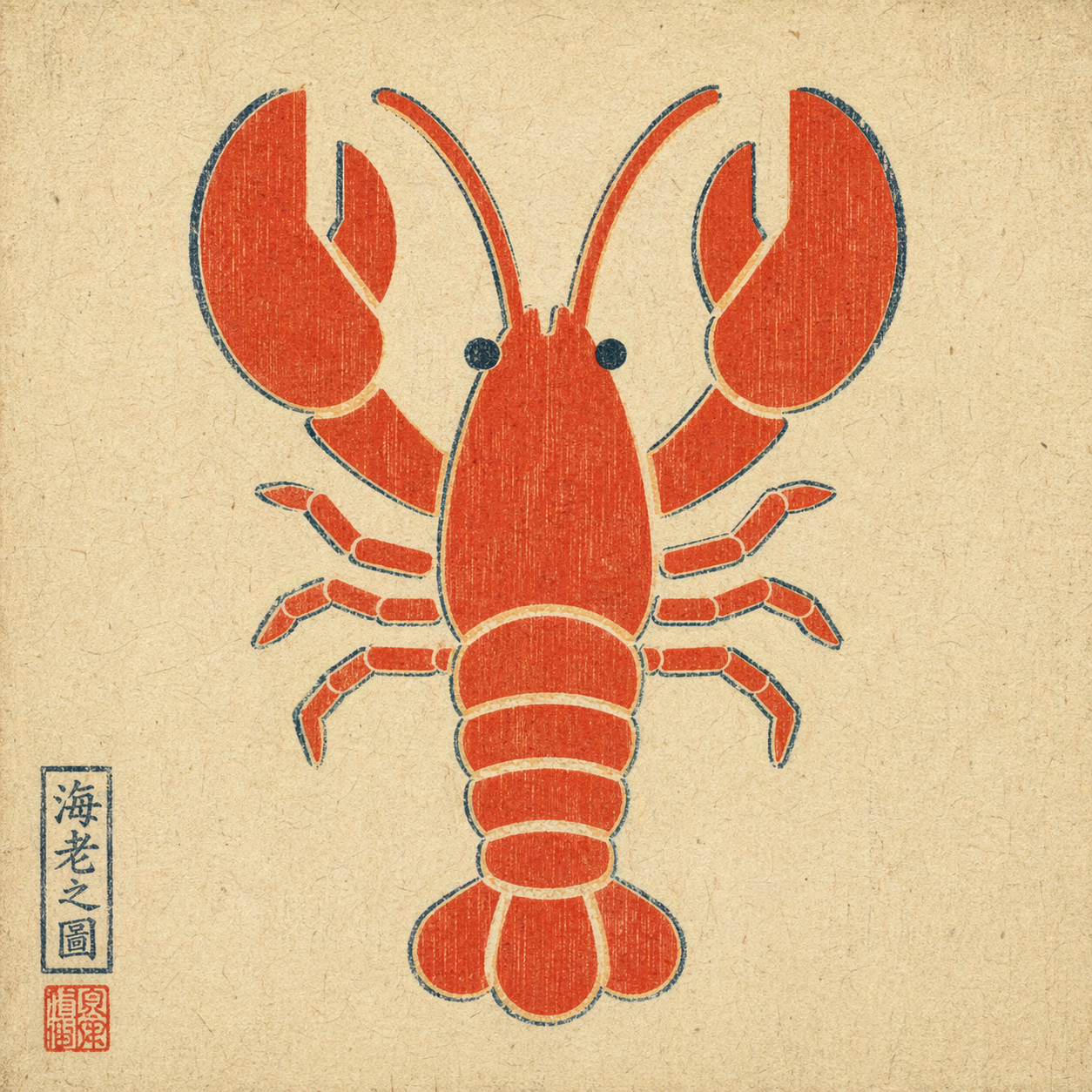 *Example output: a plain flat-color icon repainted via `--ref` in ukiyo-e style — composition preserved, rendering swapped, period-appropriate red seal added by the model unprompted.* ## When to trigger Trigger when the user explicitly asks for GPT Image 2 via their ChatGPT subscription, for example: - "use GPT Image 2" / "use gpt-image-2" / "use ChatGPT Images 2.0" - "use Image 2" / "image 2 this" - attached a reference image and asked to remix / edit / restyle it Do **not** auto-trigger for a plain "generate an image" request if the user didn't specify this route. If they did specify it, do not silently fall back to HTML mockups, screenshots, or a different image model. ## How to invoke A single bash script handles everything: runs `codex exec` with the right flags, then decodes the generated image from the persisted session rollout. **Text-to-image:** ```bash bash scripts/gen.sh \ --prompt "<user's raw prompt>" \ --out <absolute/path/to/output.png> ``` **Image-to-image** (reference flag is repeatable for multi-reference composition): ```bash bash scripts/gen.sh \ --prompt "<user's raw prompt, e.g. 'repaint in watercolor'>" \ --ref /absolute/path/to/reference.png \ --out <absolute/path/to/output.png> ``` Optional: `--timeout-sec 300` (default 300). ## Default behavior - **Pass the user's prompt through raw.** Do not translate, polish, or add style modifiers unless the user asked for it. - **Choose the output path.** Default to `./image-<YYYYMMDD-HHMMSS>.png` in the current working directory if the user didn't specify. - **Deliver the image.** After the script succeeds, display / attach the output file. Do not stop at "done, see path X". - **Text-heavy layouts are fine.** Image 2 handles infographics and timeline prompts well. Do not preemptively warn just because a prompt has a lot of text. ## Hard constraints - Do not switch routes without permission. If the user said "use GPT Image 2", do not substitute DALL·E, Midjourney, an HTML mockup, or a manual screenshot workflow. - Do not rewrite the prompt unless asked. - Do not imply this skill works without a local `codex` login and a valid ChatGPT subscription with image-generation entitlement. ## Prerequisites 1. `codex` CLI installed — `brew install codex` or see [openai/codex](https://github.com/openai/codex). 2. Logged in with a ChatGPT plan that includes Image 2 — `codex login`. 3. `python3` on PATH (ships with macOS; `apt install python3` on Linux). This skill does **not** grant image-generation capability on its own. It exposes the capability the user already has through their ChatGPT subscription. ## Exit codes | code | meaning | |------|---------| | 0 | success — output path printed on stdout | | 2 | bad args | | 3 | `codex` or `python3` CLI missing | | 4 | `--ref` file does not exist | | 5 | `codex exec` failed (auth? network? model?) | | 6 | no new session file detected | | 7 | imagegen did not produce an image payload (feature not enabled, quota, or capability refused) | On failure, name the layer in one sentence instead of dumping the full stderr at the user. ## How it works The `codex` CLI reuses the logged-in ChatGPT session and exposes an `imagegen` tool (gated behind the `image_generation` feature flag). The script: 1. snapshots `~/.codex/sessions/` before the run 2. runs `codex exec --enable image_generation --sandbox read-only ...` (with `-i <file>` for each reference image) 3. diffs the sessions directory, then invokes `scripts/extract_image.py` to scan every new rollout JSONL for a base64 image payload (PNG / JPEG / WebP magic-header match) 4. decodes the largest matching blob and writes it to `--out` Two non-obvious flags other wrappers get wrong on codex-cli 0.111.0+: - `--enable image_generation` is **required**; the feature is still under-development and off by default. - `--ephemeral` **must not** be used — ephemeral sessions aren't persisted, so the image payload has nowhere to live. ## Data handling The script is narrowly scoped on purpose: - It reads **only** session rollout files created by its own `codex exec` invocation. The sessions directory is snapshotted before the call and diffed after, so any prior `~/.codex/sessions/*` files (which may contain unrelated Codex conversations) are never touched, read, or transmitted. - It writes only two kinds of file: the output PNG at the caller's `--out` path, and short-lived `mktemp` logs that are auto-deleted on exit via a trap. - No environment variables are read. No credentials are requested. No other paths under `~/.codex/` are accessed. - No network calls leave this skill. The only outbound traffic is the one made by the `codex` CLI itself (to OpenAI, using the user's existing ChatGPT login) — this skill does not add endpoints, telemetry, or callbacks. ## What this skill is not Not a direct OpenAI API client. Not a capability grant — it depends on the user's working Codex CLI login. Not a multi-tenant service (one call per invocation; concurrent calls are serialized by the filesystem-snapshot diff).
From cskwork/agent-skills, MIT.
More from cskwork/agent-skills
- 0.526score
streamdeck-agent-cockpit
cskwork
Use when a user wants a standalone Stream Deck cockpit for Claude Code, Codex, Pi, JCode, or other terminal agents: personalize buttons…
SkillBFreshness: B★ 1Claude Code +9 - 0.526score
skill-lab
cskwork
Build and iteratively improve agent skills with evaluations, benchmarks, and trigger optimization.
SkillBFreshness: B★ 1Claude Code +9 - 0.523score
browser-qa
cskwork
Run browser QA with reviewable YAML scenarios, engine selection, and browser/API evidence.
SkillBFreshness: B★ 1Claude Code +9 - 0.521score
sync-skill
cskwork
Deploy one skill to every coding agent (Claude Code, Codex, opencode, Hermes) by keeping ONE canonical dir and symlinking it into each agent's skills dir -…
SkillBFreshness: B★ 1Claude Code +9 - 0.521score
gh-release
cskwork
Cut a versioned GitHub release for a repo - tag, push, and publish release notes from the changelog.
SkillBFreshness: B★ 1Claude Code +9 - 0.521score
refine-skill-terse
cskwork
Tighten a SKILL.md so agents (not humans) read it fast - cut prose, keep the procedure, move rationale out.
SkillBFreshness: B★ 1Claude Code +9 - 0.518score
superpm
cskwork
Produce focused PM artifacts and verify them with a critic.
SkillBFreshness: B★ 1Claude Code +9 - 0.518score
skill-cleanup
cskwork
Archive unused or stale Claude/Codex skills based on skill usage stats without deleting content.
SkillBFreshness: B★ 1Claude Code +9 - 0.518score
skill-usage-stats
cskwork
Generate an HTML dashboard of Claude/Codex skill and prompt usage, including counts, last-used dates, session reach, and disk size.
SkillBFreshness: B★ 1Claude Code +9 - 0.518score
sdlc-kit
cskwork
Gated SDLC loop with human approvals.
SkillBFreshness: B★ 1Claude Code +9 - 0.511score
naver-blog-poster
cskwork
Create, migrate, or edit the user's Naver blog posts with their saved Korean reading format, native subheadings, centered text, and responsive paragraph flow.
SkillBFreshness: B★ 1Claude Code +9 - 0.503score
impeccable
cskwork
Use when the user wants to design, redesign, shape, critique, audit, polish, clarify, distill, harden, optimize, adapt, animate, colorize, extract, or…
SkillBFreshness: B★ 1Claude Code +9
Signals
- Stars
- 1
- Forks
- 0
- Open issues
- 0
- Last commit (this folder)
- Sep 17, 2026 (1 month ago)
From GitHub (fetched Oct 24, 2026).
Details
- License
- MIT
- Repository
- github.com/cskwork/agent-skills
- First seen
- Oct 24, 2026
- Last checked
- Oct 24, 2026
- Source
- GitHubgithub-graphql
More from cskwork
- 0.586score
motion-graphics
cskwork
Make code-driven motion-graphics videos rendered from HTML, frame-accurate and reproducible.
SkillAFreshness: A★ 3Claude Code +9 - 0.586score
bughunt
cskwork
Find and fix interaction bugs in games, CRUD apps, AI chat and media apps with seeded self-playing personas, per-step invariant oracles, reproducible failure…
SkillAFreshness: A★ 3Claude Code +9 - 0.586score
gpt-image-2
cskwork
Generate images with ChatGPT's current image model (GPT Image 2 at the time of writing, and whatever model succeeds it) inside your agent, using your existing…
SkillAFreshness: A★ 3Claude Code +9 - 0.586score
diagram-design
cskwork
Create branded architecture, architecture delta, IT current-state, flowchart, sequence, state machine, ER/data model, timeline, swimlane, quadrant…
SkillAFreshness: A★ 3Claude Code +9 - 0.586score
image-first-ui
cskwork
Image-first interface creation.
SkillAFreshness: A★ 3Claude Code +9 - 0.586score
db-intelligence
cskwork
Unified database intelligence for PostgreSQL, MySQL, SQLite, and MongoDB in one skill: detect the engine, connect credential-safe, extract schema, build an…
SkillAFreshness: A★ 3Claude Code +9
Cite this page
gpt-image-2 skill. Agent Mart. https://agentmart.dev/skills/cskwork-gpt-image-2-61ec9c (last updated 2026-10-24)