gpt-image-2
Generate images with ChatGPT's current image model (GPT Image 2 at the time of writing, and whatever model succeeds it) inside your agent, using your existing…
Skill by cskwork
Install
Works with Claude Code, Claude apps, Codex, Cursor, Gemini CLI, GitHub Copilot, VS Code, OpenCode, Goose, Windsurf. Read the repository before you give any tool access to your data.
npx agentmarket install skill/cskwork-gpt-image-2
Asks which of your tools to add it to (Claude Code, Codex, Cursor, VS Code, Windsurf, Gemini CLI, Claude Desktop) and shows the change first. See https://agentmart.dev/cli.
Get the weekly diff
The weekly diff: one email a week with new agent tools, notable updates and grade changes, plus security alerts for tools you follow. Double opt-in, one-click unsubscribe.
About
Use cases: design, writing, agent-building
Reviews
Write a reviewNo reviews yet. Installed it? Reviews come from verified installers only. How reviews work
Permissions
What this skill can do and what it asks for, from its SKILL.md. Checked Oct 25, 2026.
- Tools
- No tools found
- Secrets
- None asked for
- Install scripts
- None found
- Runs as
- Python package
Network hosts it talks to 1
codeload.github.com· found in install command
Files it touches
~/.claude/skills/gpt-image-2
What's inside
- Skill name
gpt-image-2- Description
- Generate images with ChatGPT's current image model (GPT Image 2 at the time of writing, and whatever model succeeds it) inside your agent, using your existing ChatGPT Plus or Pro subscription — no separate OpenAI access, no per-image billing. Supports text-to-image, image-to-image editing, style transfer, and multi-reference composition via the local Codex CLI. Triggers on "gpt image", "gpt-image-2" or any later version, "ChatGPT Images", "image 2", or any explicit ask to generate or edit an image through the user's ChatGPT plan or Codex.
- License
- MIT
- Instructions
- 147 lines in SKILL.md · view on GitHub
Before installing
- Ships executable scripts
Files (5)
- LICENSE
- SKILL.md
- batch.py · scripts/
- extract_image.py · scripts/
- gen.sh · scripts/
SKILL.md (first lines)
# 🪞 GPT Image 2 — Image Generation via Your ChatGPT Subscription
[agentspace.so](https://agentspace.so/?utm_source=skills.sh&utm_medium=skill&utm_campaign=gpt-image-2) · [GitHub](https://github.com/agentspace-so/agent-skills/tree/main/gpt-image-2)
Generate images with **GPT Image 2** (ChatGPT Images 2.0) inside your agent, using your existing ChatGPT Plus or Pro subscription — **no separate OpenAI access, no Fal or Replicate tokens, no per-image billing.**
Text-to-image, image-to-image editing, style transfer, and multi-reference composition. Runs entirely through the local `codex` CLI you're already logged into.
> **Heads up — this skill requires a ChatGPT Plus or Pro subscription _plus_ the Codex CLI installed locally.** If you have neither, you can use GPT Image 2 in the browser via RunComfy instead — hosted, no ChatGPT subscription or local install needed (RunComfy account required):
>
> - **Text-to-image:** [runcomfy.com/models/openai/gpt-image-2/text-to-image](https://www.runcomfy.com/models/openai/gpt-image-2/text-to-image)
> - **Image edit (i2i):** [runcomfy.com/models/openai/gpt-image-2/edit](https://www.runcomfy.com/models/openai/gpt-image-2/edit)
>
> The rest of this document covers the local Codex CLI flow for agents whose user has a ChatGPT subscription.
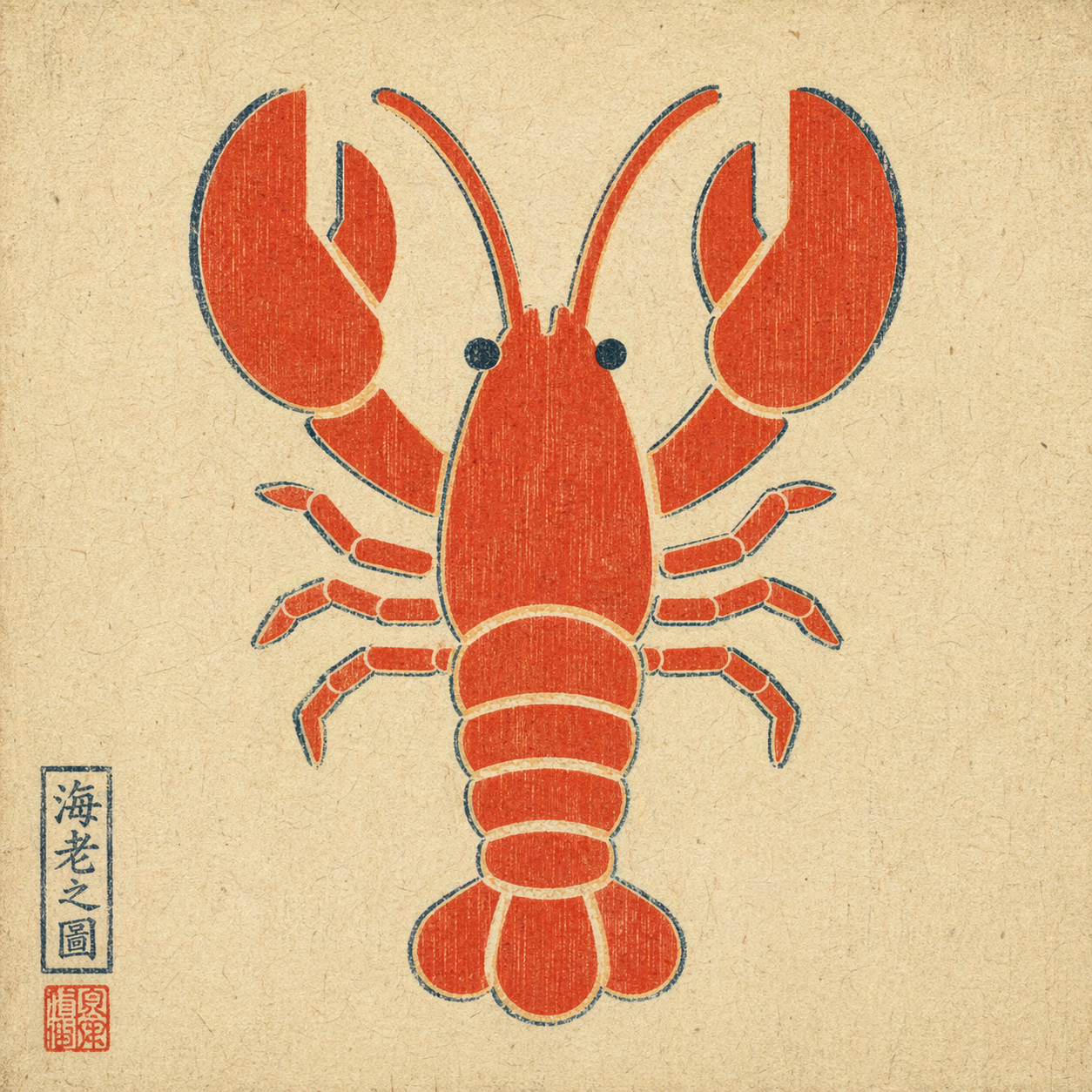
*Example output: a plain flat-color icon repainted via `--ref` in ukiyo-e style — composition preserved, rendering swapped, period-appropriate red seal added by the model unprompted.*
## When to trigger
Trigger when the user explicitly asks for GPT Image 2 via their ChatGPT subscription, for example:
- "use GPT Image 2" / "use gpt-image-2" / "use ChatGPT Images 2.0"
- "use Image 2" / "image 2 this"
- attached a reference image and asked to remix / edit / restyle it
Do **not** auto-trigger for a plain "generate an image" request if the user didn't specify this route. If they did specify it, do not silently fall back to HTML mockups, screenshots, or a different image model.
## How to invoke
A single bash script handles everything: runs `codex exec` with the right flags, then decodes the generated image from the persisted session rollout.
**Text-to-image:**
```bash
bash scripts/gen.sh \
--prompt "<user's raw prompt>" \
--out <absolute/path/to/output.png>
```
**Image-to-image** (reference flag is repeatable for multi-reference composition):
```bash
bash scripts/gen.sh \
--prompt "<user's raw prompt, e.g. 'repaint in watercolor'>" \
--ref /absolute/path/to/reference.png \
--out <absolute/path/to/output.png>
```
Optional: `--timeout-sec 300` (default 300). One image takes about 1–2.5 min.
## Parallel / batch
Each `gen.sh` call reads only its own Codex session, so calls can run concurrently. For several images, write a JSONL file (one job per line; `refs` optional) and run:
```bash
python3 scripts/batch.py jobs.jsonl --workers 3
```
```json
{"prompt": "<prompt>", "out": "/abs/out-1.png", "refs": ["/abs/ref.png"]}
```
- Skips jobs whose `out` already exists, so re-running resumes a stopped batch.
- Stops starting new jobs on a quota/rate-limit hit (exit 9). Exit 1 if any job failed.
- Default and verified: 3 workers. All workers share one plan quota.
- A job that uses another job's output as `--ref` must run in a later batch.
## Default behavior
- **Pass the user's prompt through raw.** Do not translate, polish, or add style modifiers unless the user asked for it.
- **Choose the output path.** Default to `./image-<YYYYMMDD-HHMMSS>.png` in the current working directory if the user didn't specify.
- **Deliver the image.** After the script succeeds, display / attach the output file. Do not stop at "done, see path X".
- **Text-heavy layouts are fine.** Image 2 handles infographics and timeline prompts well. Do not preemptively warn just because a prompt has a lot of text.
## Hard constraints
- Do not switch routes without permission. If the user said "use GPT Image 2", do not substitute DALL·E, Midjourney, an HTML mockup, or a manual screenshot workflow.
- Do not rewrite the prompt unless asked.
- Do not imply this skill works without a local `codex` login and a valid ChatGPT subscription with image-generation entitlement.
## Prerequisites
1. `codex` CLI installed — `brew install codex` or see [openai/codex](https://github.com/openai/codex).
2. Logged in with a ChatGPT plan that includes Image 2 — `codex login`.
3. `python3` on PATH (ships with macOS; `apt install python3` on Linux).
This skill does **not** grant image-generation capability on its own. It exposes the capability the user already has through their ChatGPT subscription.
## Exit codes
| code | meaning |
|------|---------|
| 0 | success — output path printed on stdout |
| 2 | bad args |
| 3 | `codex` or `python3` CLI missing |
| 4 | `--ref` file does not exist |
| 5 | `codex exec` failed (auth? network? model?) |
| 6 | no session rollout found for this run |
| 7 | imagegen did not produce an image payload (feature not enabled, or the agent never called the tool) |
| 8 | refused by the image tool's content policy; the prompt was not softened |
| 9 | ChatGPT/Codex usage limit, quota or rate limit hit |
On failure, name the layer in one sentence instead of dumping the full stderr at the user. On 8, tell the user it was refused and ask how to rephrase; do not soften it yourself unless asked. On 9, stop and tell the user the plan limit was hit.
On success, stderr may show `image tool received a rewritten prompt:` with the prompt the tool actually got. If it changed the meaning (not just wording), tell the user.
## How it works
The `codex` CLI reuses the logged-in ChatGPT session and exposes an `imagegen` tool (gated behind the `image_generation` feature flag). The script:
1. runs `codex exec --json --sandbox read-only ...` (adding `--enable image_generation` only if the feature is off, and `-i <file>` for each reference image), with an instruction not to soften or retry a refused prompt
2. reads the `thread.started` event's `thread_id` from stdout and opens only `~/.codex/sessions/**/rollout-*<thread_id>.jsonl`
3. `scripts/extract_image.py` takes the last `image_gen.generation` item with `status: completed`; its `result` is the base64 image and `revisedPrompt` is what the tool received. A `failed` item means refused (exit 8).
4. fallbacks, in order: largest base64 image blob in the rollout (only when it has no `image_gen.generation` item, since with `--ref` the largest blob can be the reference), then the largest image under `~/.codex/generated_images/<thread_id>/`
5. quota/rate-limit text in stderr or in `error` / `turn.failed` events → exit 9
Model-agnostic by design: the script never names an image model. It calls whatever model the Codex `imagegen` tool uses, so a newer ChatGPT image model works without changes here.From cskwork/skills, MIT.
More from cskwork/skills
- 0.586score
db-intelligence
cskwork
Unified database intelligence for PostgreSQL, MySQL, SQLite, and MongoDB in one skill: detect the engine, connect credential-safe, extract schema, build an…
SkillAFreshness: A★ 3Claude Code +9 - 0.586score
motion-graphics
cskwork
Make code-driven motion-graphics videos rendered from HTML, frame-accurate and reproducible.
SkillAFreshness: A★ 3Claude Code +9 - 0.586score
diagram-design
cskwork
Create branded architecture, architecture delta, IT current-state, flowchart, sequence, state machine, ER/data model, timeline, swimlane, quadrant…
SkillAFreshness: A★ 3Claude Code +9 - 0.586score
image-first-ui
cskwork
Image-first interface creation.
SkillAFreshness: A★ 3Claude Code +9 - 0.586score
bughunt
cskwork
Find and fix interaction bugs in games, CRUD apps, AI chat and media apps with seeded self-playing personas, per-step invariant oracles, reproducible failure…
SkillAFreshness: A★ 3Claude Code +9 - 0.581score
sdlc-kit
cskwork
Four-phase SDLC loop for any codebase: intent (90% clear: explore, reproduce, research, ask the requester), plan (parallel scouts, one PLAN.md), build…
SkillAFreshness: A★ 3Claude Code +9 - 0.581score
mobile-ui-ux
cskwork
Measurable usability and interaction rules for iPhone apps, mobile web, and mobile games, with a 7-category scoring rubric, an independent-judge prompt, and a…
SkillAFreshness: A★ 3Claude Code +9 - 0.581score
quality-loop
cskwork
Product quality bar and improvement loop for iPhone apps, websites, web apps, games, and other software.
SkillAFreshness: A★ 3Claude Code +9 - 0.580score
jk
cskwork
Manage Jenkins controllers with jk, including jobs, runs, logs, artifacts, credentials, nodes, queues, and plugins.
SkillAFreshness: A★ 3Claude Code +9 - 0.578score
sol
cskwork
Orchestrate application work through GPT-6.1 Sol subagents (high reasoning, fast tier).
SkillAFreshness: A★ 3Claude Code +9 - 0.578score
update-all
cskwork
Update all coding agent harnesses (Codex, Claude Code, pi, Antigravity CLI) in one run with before/after version reporting.
SkillAFreshness: A★ 3Claude Code +9 - 0.575score
call-agent
cskwork
Delegate a bounded task to a user-named peer CLI, or to fill a capability the host lacks.
SkillAFreshness: A★ 3Claude Code +9
Signals
- Stars
- 3
- Forks
- 1
- Open issues
- 0
- Last commit (this folder)
- Oct 20, 2026 (9 days ago)
- Last release
- Oct 24, 2026 (5 days ago)
From GitHub (fetched Oct 24, 2026).
Details
- License
- MIT
- Repository
- github.com/cskwork/skills
- Website
- cskwork.github.io/skills/
- First seen
- Oct 24, 2026
- Last checked
- Oct 24, 2026
- Source
- GitHubgithub-graphql
More from cskwork
- 0.586score
bughunt
cskwork
Find and fix interaction bugs in games, CRUD apps, AI chat and media apps with seeded self-playing personas, per-step invariant oracles, reproducible failure…
SkillAFreshness: A★ 3Claude Code +9 - 0.586score
db-intelligence
cskwork
Unified database intelligence for PostgreSQL, MySQL, SQLite, and MongoDB in one skill: detect the engine, connect credential-safe, extract schema, build an…
SkillAFreshness: A★ 3Claude Code +9 - 0.586score
motion-graphics
cskwork
Make code-driven motion-graphics videos rendered from HTML, frame-accurate and reproducible.
SkillAFreshness: A★ 3Claude Code +9 - 0.586score
image-first-ui
cskwork
Image-first interface creation.
SkillAFreshness: A★ 3Claude Code +9 - 0.586score
diagram-design
cskwork
Create branded architecture, architecture delta, IT current-state, flowchart, sequence, state machine, ER/data model, timeline, swimlane, quadrant…
SkillAFreshness: A★ 3Claude Code +9 - 0.581score
mobile-ui-ux
cskwork
Measurable usability and interaction rules for iPhone apps, mobile web, and mobile games, with a 7-category scoring rubric, an independent-judge prompt, and a…
SkillAFreshness: A★ 3Claude Code +9
Cite this page
gpt-image-2 skill. Agent Mart. https://agentmart.dev/skills/cskwork-gpt-image-2 (last updated 2026-10-24)